Product test · Image cleanup · FIELD GUIDE
AI image watermark removal tested: does it change faces, labels or the rest of the image?
A corner mark can disappear clearly, but the model may still change pixels that were never covered. We measured a synthetic portrait with three watermark placements and a no-watermark control.
The result: a cleared watermark does not mean an unchanged picture
We used one synthetic portrait that does not depict an identified real person. Locally generated marks were added as an opaque corner logo, translucent text across the face and a tiled pattern. A clean, unmarked version served as a control. We sent the marked inputs to the image-editing provider and compared its outputs pixel by pixel with a clean reference and known masks that were never sent to the model.
For the corner case, mean error inside the watermark mask fell from 160.50 to 1.73 on a 0–255 pixel scale, so the visible mark was almost entirely replaced in that region. But the change was not limited to the mark: mean error outside the mask was 3.91, and 19.1% of outside pixels changed by more than 8 in at least one color channel. The clean control also changed: 23.1% of its pixels crossed that threshold.
The supported conclusion is narrow: in these controlled samples, the marked area was visibly regenerated. The experiment does not support “only watermark pixels changed,” “the original background was recovered exactly,” or “all portraits are preserved safely.”
Four controlled conditions
All four inputs are 1024 × 1024 versions of the same synthetic portrait. Because the marks were composited locally, we have a clean reference image and exact masks. The model received only marked inputs and written instructions, not the clean reference or ground-truth mask. That allows us to score covered regions while checking whether the prompt was followed.
| Condition | Pixels covered | Setup |
|---|---|---|
| Opaque corner text/logo | 2.05% | Small mark over a flat background |
| Translucent text across eyes and nose | 2.63% | Text crosses facial detail |
| Translucent text tiled over the image | 13.82% | Several marks cross face, hair and clothing |
| Clean, unmarked control | 0% | Tests whether the model changes an image anyway |
The requests specified GPT Image 2 and maximum quality through the image-editing proxy configured in this project. The proxy's actual backend model was not independently confirmed, and we did not verify a bill. Latency includes proxy processing and image download; it is not pure model inference time.
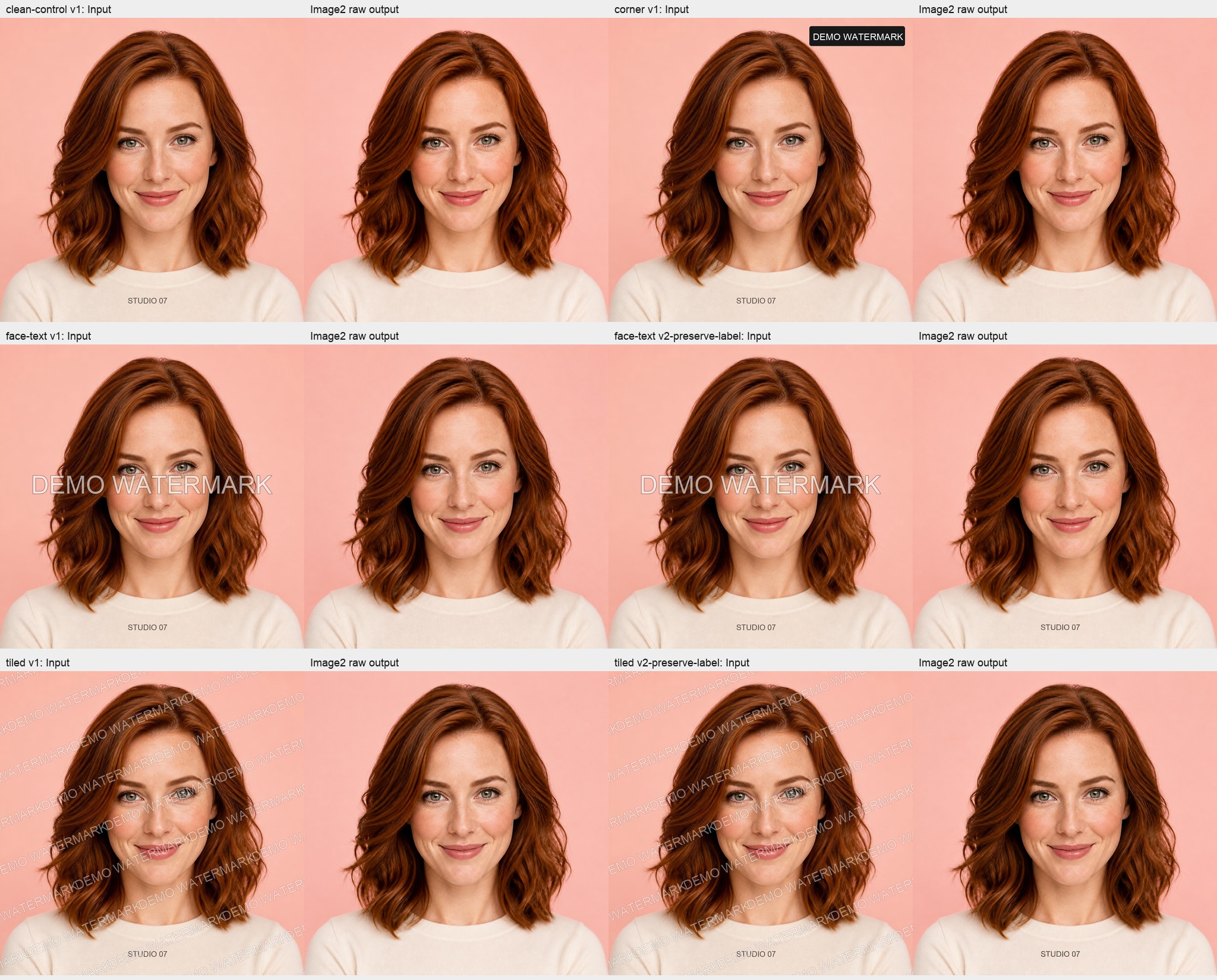
The covered area improved while the rest still changed
The first prompt asked the model to preserve the person, clothing, background and normal text, but did not specify an edit mask. The table reports mean absolute RGB error inside the known watermark region; a lower number is closer to the pre-existing clean synthetic reference. The images have matching dimensions but were not aligned after generation, so texture and small geometric changes also contribute to error.
| Test | Area covered | Latency | Masked-region MAE: input → output | Unmasked pixels changing by more than 8 |
|---|---|---|---|---|
| Opaque corner mark | 2.05% | 36.1 s | 160.50 → 1.73 | 19.1% |
| Translucent face text · first prompt | 2.63% | 47.3 s | 55.66 → 6.93 | 17.3% |
| Tiled text · first prompt | 13.82% | 69.4 s | 26.46 → 5.41 | 25.9% |
| Clean, unmarked control | 0% | 44.2 s | N/A | 23.1% |
“Pixels changing by more than 8” is a fixed threshold count. It is not the share of changes a person would notice, and it says nothing about identity similarity. It is a prompt to inspect areas outside the watermark, not a whole-image quality score. Unaligned pixel comparison also counts regenerated texture and slight position shifts.
Did asking the model to preserve a clothing label help?
The portrait has ordinary text, STUDIO 07, printed on the shirt. The first prompt broadly asked the model to preserve text, but the output still changed that label. We made a second request naming DEMO WATERMARK as the only mark to remove and asking the model to keep STUDIO 07 exactly. This is a prompt comparison on the same synthetic image, not a repeated sample of another photo.
For face text, the second request lowered masked-region MAE from 6.93 to 6.73, a small change. In the unmasked face region, the share of pixels changing by more than 8 moved from 24.74% to 24.11%. For the legitimate shirt label, the same threshold metric rose from 26.61% to 31.54%; the more explicit preservation instruction did not reliably protect it. The second tiled-watermark prompt also improved the masked-region metric, but over half the ordinary label pixels still changed by more than 8.
More specific instructions can affect one output, but do not act like an edit mask and do not guarantee exact preservation. A generative model returns a newly rendered image. To limit changes to the marked region, a workflow would also need reliable localization and compositing constrained to that mask. Automatic localization on real images can itself include or exclude the wrong pixels.
Repair is not recovery of the original pixels
Because this test knows the exact watermark area, we can use the ground-truth mask during offline scoring to composite the generated patch back into the original. That preserves all outside pixels exactly, but it is a measurement helper, not something the model did or the current product automatically guarantees. A normal user uploads only a marked image; the actual original boundary is unknown.
Even a low masked-region MAE means the model generated plausible replacement content. It did not read the original pixels hidden behind the mark. Hair strands, skin texture, small clothing labels and unique objects can be redrawn. A corner logo over a flat sky is easier to make look natural than text across eyes or a tiled mark across the entire picture.

When this workflow may be useful
- A small mark sits over a flat background: the replacement may blend more easily, but still inspect the face, edges and ordinary text.
- Translucent lettering crosses a face, fabric or important object: compare the original and output around eyes, hair, weave and legitimate labels.
- A tiled or large watermark covers many regions: there is more to regenerate; review each area and keep the original or crop if the result is unsuitable.
- An image has no visible mark: the clean control changed too, so do not upload a sensitive portrait just to experiment.
- You have the right to edit the image: open the image watermark remover, compare both views and download only a version you have checked.
When you start the image tool, the picture is sent to the configured image-processing service. Upload only images you may share with that provider. A generated result can change faces, scene text or other content. Comparison and retry controls help inspect alternatives; they do not promise exact restoration.
Limitations of this test
There is one synthetic portrait with three mark placements and one clean control. It is not a statistical sample of different people, cameras or real website images, and it includes no independent blind review or identity verification. The exact mask exists for scoring only; the model did not receive it. A real product workflow must also locate the watermark.
MAE and the “change greater than 8” count are unaligned RGB pixel comparisons. Generated texture and slight positional shifts affect them. They do not judge attractiveness, whether a face remains recognizable or general edit quality. Latency changes with network, proxy, image decoding and download.
The record includes the requested model name and quality, not independent verification of the proxy's actual backend, cost or retention period. The second preservation prompt was run on the same synthetic portrait. It cannot establish a general improvement from prompts or predict another model or version.
Data and source notes
The experiment was run on 2026-10-14. All four conditions use an existing synthetic portrait and no real user photo. Inputs, marks, exact masks, prompts, outputs and metrics are archived in the project's experiment directory. The contact sheet shows the input cases and raw generated outputs; the corner image is one actual processing result.
The portrait was created for project testing and does not depict an identified person; the watermark was generated locally. STUDIO 07 is legitimate clothing text and a preservation target. The first request did not reliably keep it unchanged. The second explicitly requested preservation, but pixel differences remained. Check more than whether the watermark disappeared.