Pre-publication review · FIELD GUIDE
Privacy review before publishing an interview: faces, voice, captions and background
Covering a face is not the same as anonymizing a video. Voice, captions, badges, screens, locations and recurring backgrounds can all identify someone. Review picture, sound, text and file copies together.
Define who or what you are protecting
Before review, write down who will see the material, where it will appear, how long it will remain available and what uses the guest approved. The same interview may be suitable for internal training but not public social media. Agreeing to be recorded does not necessarily mean agreeing to publish a full name, workplace, face and original voice. Requirements depend on the project, region and platform; the publishing owner must decide them, not the editing software.
Group identity clues into several types: direct identifiers such as names, phone numbers, email, addresses and ID numbers; details that identify someone when combined, such as employer, role, project, date and location; biometric or personal traits such as face, voice, tattoo, accent and distinctive clothing; and easy-to-miss background details such as access cards, screens, license plates, landmarks, schedules on a wall or a reflection of the camera operator.
Make a release checklist that a teammate can follow. One minor may need both a face cover and a pseudonym; one interviewer may only want the employer hidden; another guest may allow their original voice but not a full name in captions. Record the exact approved scope instead of asking each editor to guess. If consent changes, review every edit and platform copy again.
Protecting identity can conflict with retaining evidence. A controlled original may need to remain available for authorization or review, while the public copy removes or covers sensitive details. Store them separately, restrict access to the source, and do not overwrite the only master in the name of anonymizing it. Share only the copy that a recipient needs, and label it clearly as a working or public version.
Look for picture clues throughout the clip
Play the original from beginning to end, pausing at each scene change. Check frontal and profile views, window reflections, mirrors, phone screens, computer desktops, badges and vehicles. Follow changes from wide to close shots: a card unreadable in the distance may become clear when the camera pushes in; a brief background shot may show a neighborhood or floor sign.
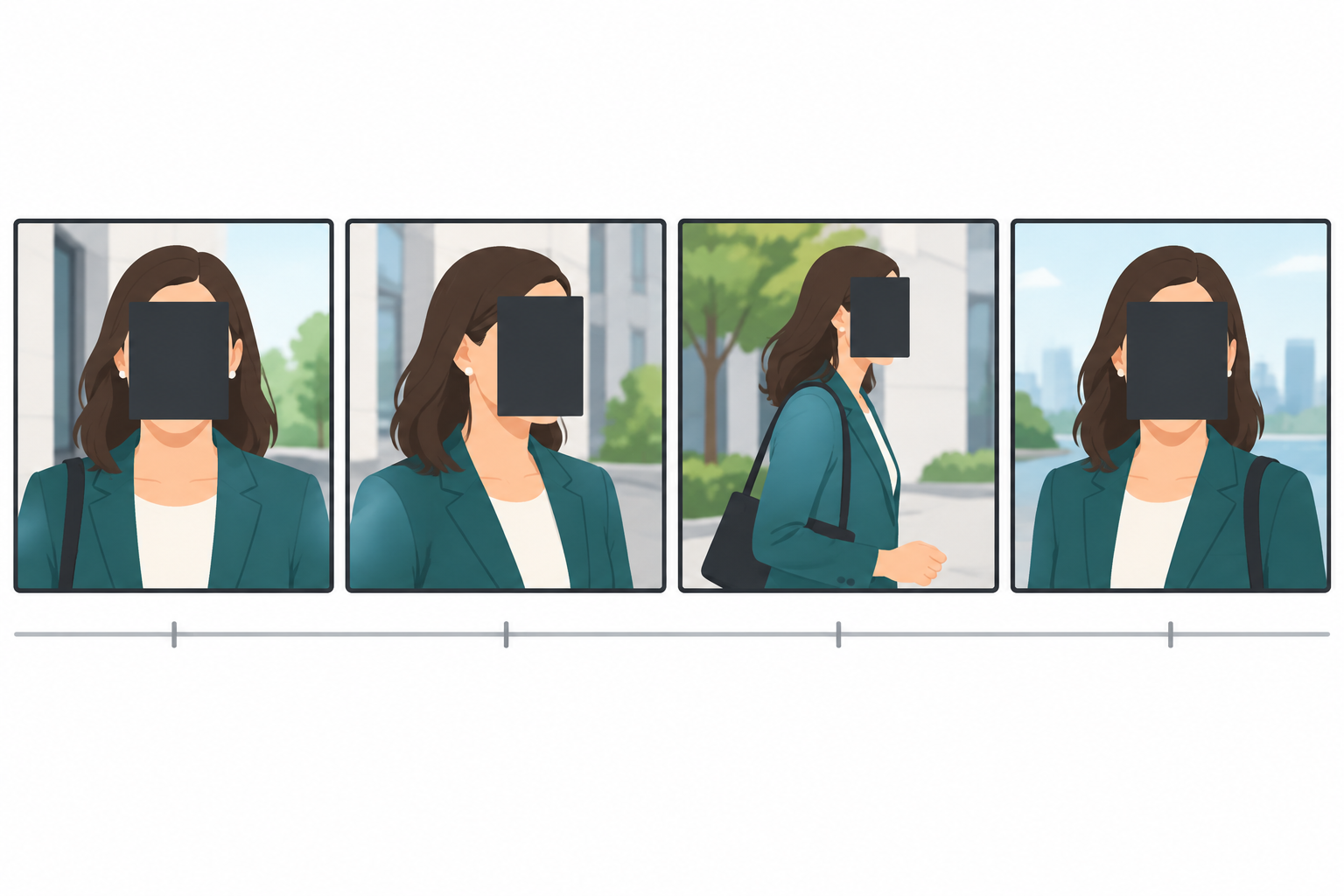
Check whether people turn, stand, enter or leave the frame. A fixed rectangle is only suitable when a person stays seated and their face barely moves. A moving subject can leave the covered area, and a camera pan can make tracking drift. Give extra attention to camera changes, turns, objects passing in front of a face, fast motion and sudden lighting changes.
Choose the cover area deliberately. Covering only the eyes may leave face shape, hair and clothing recognizable. Covering the entire face may be more complete but can obscure a gesture or expression. The right balance depends on resolution, angle, duration and what the audience already knows. The illustration compares coverage; it does not define an area that guarantees safety.
Face covering can help with frame-by-frame editing, but it cannot prove that a clip is unidentifiable. After using the video face-cover tool, watch the full output and seek to unmarked moments at random. Check the first and last frames, every edit join and the thumbnail generated after export. Seeing the cover in a preview does not show that it stayed over the face in the entire clip.
Voice and captions can identify someone too
An acquaintance may recognize someone from their voice alone. Changing pitch or adding ambience may not hide identity; accent, rhythm, vocabulary and familiar background sounds can remain clues. If the project requires the guest to be unrecognizable, confirm whether to mute, replace or remove selected speech, and have the authorized owner approve the plan. Keeping the original voice is normally the default; identity processing should follow the real consent and purpose.
Review captions, title cards, lower thirds, auto-generated descriptions, cover images, social captions and notes inside the editing project. A name can remain in subtitles even when it is absent from the picture. Captions need their own review because a face-cover effect does not change subtitle files or video descriptions.
If only selected words need to be hidden, mute or bleep the exact intervals in a copy of the audio. Open the audio censoring tool. Listen around both boundaries: a partial mute may leave the first consonant or last stressed syllable. Abrupt edges can click; an overly wide selection can make nearby speech hard to understand. Muting a public copy does not erase the original recording.
Keep a timestamp log with the risk, media to change, owner and review status. Replace vague notes such as “blur this” with something actionable: “00:14.2 badge is readable; confirm whether to cover it; 00:37.5 caption shows full name; use approved role label; 01:04.0 screen has project code; crop and review again.” Specific notes let another editor inspect the same point.
Preserve a review trail before and after processing
Do not edit the only source file. Keep it in a controlled location, make a working copy and export a new public version. Store source, working and public files separately with clear labels. If the original must be retained as evidence, the public copy does not replace it. If source material no longer needs to be kept, follow the project's retention rules and record the cleanup.
Review the actual exported file, not just the cover box in the editor. Players can expose differences at the first frame, last frame, pause, zoom or color conversion. Watch each section and seek to random middle frames. Check faces, screens, badges and location signs. Inspect platform-generated thumbnails and previews too; they may select an uncovered frame.
If the output includes captions or multiple audio tracks, inspect each one. Check that hidden captions do not retain a name, that there is no unprocessed alternate voice track, and that the thumbnail does not use the source frame. File properties may contain an author, project or location; whether to remove them depends on the delivery and project requirements. Compression, renaming or upload does not necessarily remove metadata.
Arrange a second review for an important release. Ask another person to watch the complete file and check it on different devices and window sizes. Give them the review list, but do not tell them in advance exactly where every edit was made; that can make them inspect only the expected points and miss a reflection or background clue. Record the reviewed version, date and unresolved questions before release.
Do not forget alternate versions
An interview may have a full version, short edits, portrait and landscape exports, captioned and uncaptioned files. A cover that passed on one version may not be present on another. List every export and note its aspect ratio, tracks, caption file, thumbnail and review status. Whenever a caption or edit changes, check that the exact file to upload is still the approved version.
Separate caption files, editing projects, social descriptions and titles may keep a name that was cut from the video. Search the delivery folder for old filenames and text copies, and move risky working versions back to controlled storage. Check hidden tracks in the editing project too: a track not visible in the current export may reappear when someone else opens the project.
Review thumbnails separately. An automatic poster may select the first uncovered frame or a brief face at a cut. Open every preview generated for each platform. If the platform chooses a cover automatically, upload an approved frame or select one without people. Shared-link previews may cache an older thumbnail, so confirm what is still visible on the public page after replacing a video.
Titles, descriptions and tags must follow the same consent scope. Calling an interview “anonymous” does not make the file anonymous, and a well-covered picture does not justify adding unapproved location details to the description. Include public titles, tags, location labels and hashtags in the review because those fields can reveal more than the video.
Platform processing can change what is exposed. A service may recompress the picture, create thumbnails or generate captions. Those are not simple copies of the original. Auto-captions can transcribe a guest's name or a sensitive detail that was removed elsewhere. For sensitive material, consider disabling automatic transcription or review the platform's displayed captions and previews after upload.
Pause distribution if you find an omission
If a frame or caption exposes something during review, pause copying or scheduled publishing and fix a working copy. After exporting again, check more than the problem frame: make sure the timeline did not shift, the cover still tracks, the caption file was updated and the thumbnail no longer references the old version. Mark the corrected output clearly and move the failed copy out of the release folder.
If a file is already public, contact the publishing owner and follow the project's process for pausing, replacing or removing it. Removing a page does not guarantee every copy disappears; a platform may cache a thumbnail, caption or share preview. Record what happened, which version was involved and what action was taken, then let the project owner decide whether anyone needs to be notified. This is not a substitute for the organization's incident process or applicable requirements.
After review, associate the final file version, caption file, thumbnail and review record. People who do not need the original should not receive it. Editors can continue working from a public-safe copy for changes that do not need sensitive material. At the end of the project, follow retention rules so temporary downloads and shared-drive copies do not accumulate.
Common mistakes
Covering only the eyes may leave hair, face shape and scene clues. Checking a thumbnail can miss a quick turn or a few uncovered frames. A blurred picture with a full name still in captions has not met the goal. Muting a name while leaving it in the subtitle does not hide it either. Review each media type separately.
Removing all ambience in pursuit of a “clean” sound does not make an interview anonymous. A station announcement, distinctive machine or public address message can reveal location. Editors may focus on the subject and miss a screen, door sign or reflection. Ask what a stranger could infer from every clue in the public file rather than only whether the tool completed successfully.
Do not use cover area, number of edits or a detection result as a quantified guarantee of anonymity. A face cover can drift; voice modification can leave identifiable speech traits; deleting captions cannot remove text visible on paper. Tools reduce repetitive work. Release still depends on consent, context and human review.
Before publishing
- The approved audience, destination and protected identities are documented.
- Faces, reflections, badges, screens, plates, background signs and cuts are reviewed.
- Covers follow moving subjects; turns, first and last frames and edit joins are checked.
- Original voice, music, announcements and other tracks do not reveal a person or place beyond the approved scope.
- Captions, title cards, cover, filename, description and hidden subtitle tracks match the public version.
- The exported video plays from beginning to end and captions and thumbnails are checked on a phone.
- Source and public copies are stored separately; another person has reviewed the release file.
Limits and source
This checklist helps teams notice risks before release; it is not legal advice and no cover, voice change or mute is right for every project. Someone may still be recognized by speech, life details, location or other material. For content that could harm someone, expose sensitive work or affect their rights, confirm the consent and review process with the project owner. If uncertain, pause publication instead of relying on an automatic effect.
The video above uses a silent Pexels demonstration. The face-cover example is an actual QuietTake browser export and shows why a moving subject needs review throughout the clip. It does not claim that a particular guest's identity is safely hidden. Read the Pexels license.