Caption workflow · FIELD GUIDE
Turn an interview into a captioned short: transcript, timing and review
Automatic transcription can save a first draft, but it does not know your names, speaker relationships or editing intent. Proof the words, shape the captions and inspect the exported frames.
Decide what you are delivering
A transcript and captions are related, but they are different deliverables. A transcript is searchable, editable text. Captions must appear at the right time and remain readable on the target screen. Decide the purpose first: how much conversational pause to keep, whether to translate, whether to burn captions into the picture or deliver a separate file, and whether viewers need speaker labels.
A long interview often contains small talk, equipment checks, the actual questions and a sign-off. Do not select a short video by choosing the loudest section. Find a complete point that still makes sense without missing context. Check what question came before and what qualification followed. Cutting a condition can change how viewers interpret the guest. Write a one-sentence summary for each candidate before setting its edit boundaries.
Prepare the source video, separate audio, camera notes and interview brief. With several devices, confirm which speaker and time belongs to each file. A clap, spoken time marker or shared transient near the beginning can help sync them. Keep versions distinct: a model draft, a proofed transcript and a timed caption file should not all be named “final.”
Treat transcription as a draft and verify facts
Automatic transcription can mishear names, places, organizations, products, abbreviations and numbers. It can join two speakers, remove every hesitation or repeated word, or label a question as a statement. Noisy audio, unfamiliar accents and overlapping speakers all increase the need for human review. Treat the output as a draft to verify, not as an authoritative copy of the recording.
For the first review, play the source audio from beginning to end while following the text, and mark each error with a time. Fix words that change the meaning before punctuation and fillers. Confirm names and organizations from the interview brief, public references or a spelling list from the guest; do not replace a word just because another one sounds plausible. If a sentence remains unclear, mark the time and ask the guest or producer rather than filling the gap with a fluent guess.
If the transcript will be translated, proof the source-language text first. A wrong proper noun becomes harder to notice after translation. Listen to the source again after translating and check tone, negation, numbers and conditions. Bilingual captions have limited space, so preserve the central meaning and adjust syntax when necessary, but do not turn a careful statement into an absolute one.
Choose short clips from the full interview
Divide the transcript into topics and note each section's approximate start and end. Find a complete thought rather than starting with the tallest waveform peak. A useful short clip can explain a point, reason or example quickly. If it depends on earlier context, include the necessary question or add a short context card before the edit.
When removing a stumble or long pause, do not cut at the very start of a plosive, sibilant or breath. Place the cut on a natural pause, then listen a few seconds on both sides for a sudden change in tone. Picture cuts can help hide an audio edit, but a new camera angle does not prove that the tracks are in sync. Save a separate rough-cut version so you can check the original context later.
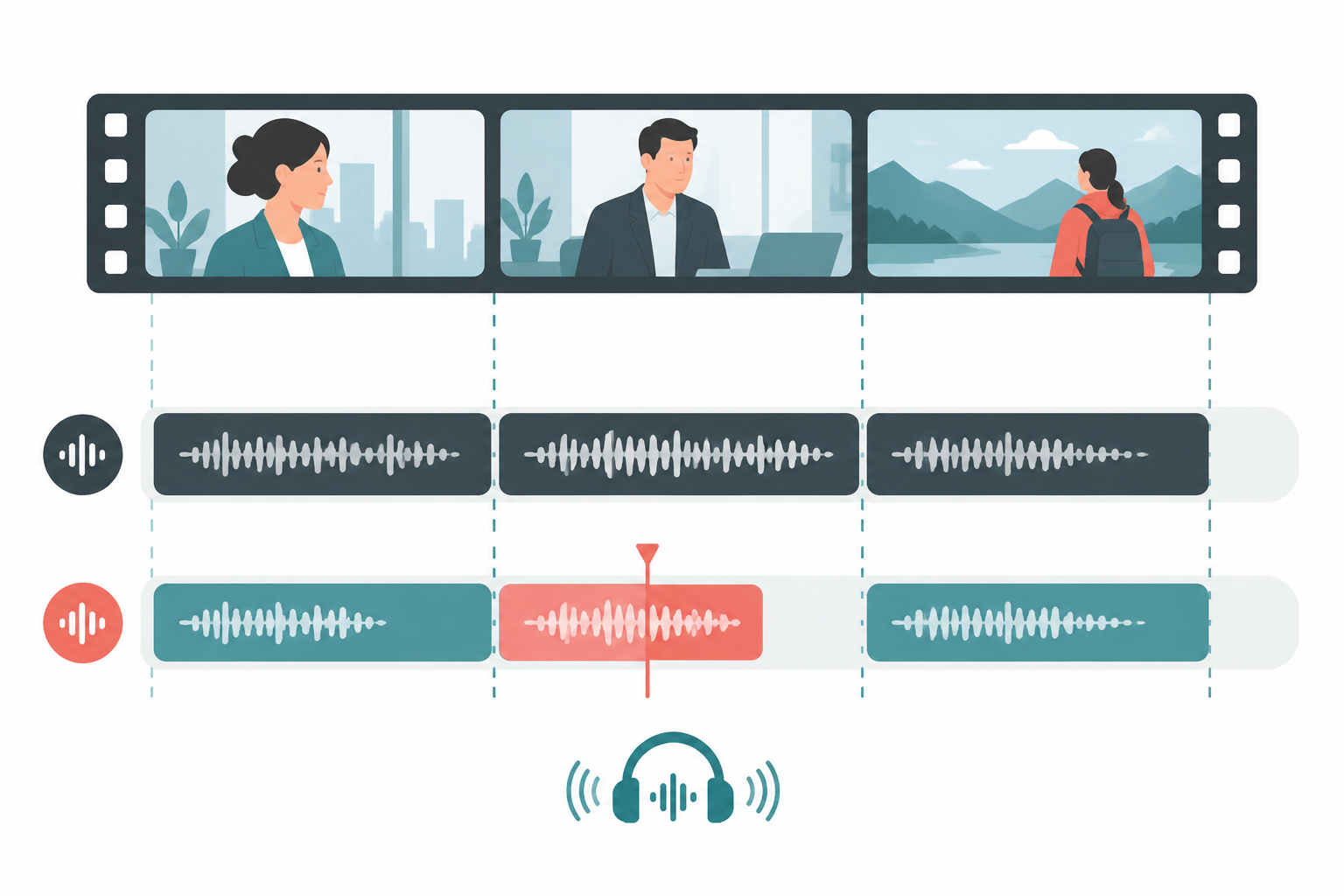
With multiple cameras, sync the full timeline before dividing captions into clips. Align the audio tracks using a shared clap or clear spoken sound, then check for drift in the middle. Some devices run at slightly different clock rates over a long take, so matching at the start does not guarantee a match at the end. The illustration shows a review concept, not a measurement from a specific recording.
Break captions for reading
Captions are not a transcript pasted onto the screen. Break them at meaning and breath so a viewer can read each thought at a glance. Keep proper names together where possible, and keep numbers with their units. A full paragraph in one caption is too much to read while watching; captions that change word by word can flash and distract.
Bilingual captions need more room. Check the platform's safe area and the video aspect ratio before deciding whether languages sit above and below one another or alternate. Player controls or device cropping may cover the bottom edge, so leave space and preview at actual phone size. Do not decide legibility from a zoomed-in desktop editor.
When speakers overlap, choose between clear speaker labels and keeping only the main thread based on what viewers need. Never merge the interviewer and guest into one sentence. Use names, initials or separate caption positions when necessary. Text color must work on both light and dark scenes; white text disappears on a white wall, and black text disappears on dark clothing.
A caption should remain long enough to read, but not linger after the subject changes. Check that each line appears and disappears with the corresponding speech, does not carry a last word into the next shot and does not vanish before a pause. For fast names or numbers, split the thought into two readable captions rather than forcing it into one screen.
Keep text and picture in one workflow
QuietTake can produce a transcription draft, then generate subtitles for a video, select a target language and export the result. Open audio-to-text; open the video subtitle tool. Proof both outputs afterward, especially names, abbreviations, numbers and short words masked by location sound.
Keep five distinct versions: source media, transcript draft, proofed transcript, caption timeline and publish output. Record the source and version for each. Make a short sample, export ten seconds and inspect it on a phone before processing the rest. If an editor will continue the work, export captions in an editable format. Burned-in captions stay consistent on social platforms but are harder to change later.
Choose export settings for the destination. Confirm aspect ratio, frame rate, resolution and audio codec, then recheck captions after changing the picture ratio. A horizontal and vertical version need separate review: the subject, safe area and title placement can all change. Preview each final aspect ratio independently.
Play the exported video from beginning to end instead of checking only the last frame in the editor. Review the opening, ending and every shot change. Listen for sync with headphones, then mute the video and check readability. Make sure captions contain no internal note, email, private phone number or name that is not approved for release. Finally, open the actual file on a second phone or player to catch blank frames, substituted fonts, overflow or missing sound.
Give multilingual and vertical versions another review
If the interview switches languages, mark which language each speaker used before deciding whether the final captions show the original, a translation or both. Apply the same rule throughout the clip. Omitting the original for one sentence can imply that it is unimportant. Keep an uncertain phrase and its timecode for a reviewer who understands both languages; fluency in an automatic translation is not proof of accuracy.
Use spellings confirmed by the project for people, places and numbers. Spoken numbers may arrive in chunks, or a speaker may use an abbreviation before saying the full name. Standardizing number formatting still requires checking magnitude, units and negation. Dates deserve special care: 03/04 can mean different dates in different regions. For an international audience, write the meaning clearly instead of using an ambiguous shorthand.
Proof every name and number, then sample ordinary sentences and inspect every edited sentence with several seconds of context on either side. If an interview becomes several clips, keep a clip list and confirm the filename, caption version and cover for each one. This prevents captions from the first clip being attached to the second.
Horizontal and vertical framing often need different edits. Cropping to portrait may cut off a guest near the edge or place captions over a face or gesture. Duplicate the editing project, adjust the picture and review every caption again. Simply changing the dimensions of a horizontal export does not account for the subject, safe area or platform controls.
Short-video platforms place usernames, titles, comments and action buttons around the player. Captions too close to the bottom may sit underneath that interface. Test a draft in the destination platform's preview when possible, not only in the camera roll. Different platforms cover different areas; inspect the thumbnail crop and caption area separately before posting the same portrait clip to multiple services.
Make the proofing status clear to the next editor
When several people work on captions, give each file a clear status such as model draft, facts checked, layout complete or release reviewed. Separate uncertain words, suggested changes and questions for the guest. A question mark should not look like a final decision, and a later editor should not have to guess again without the original discussion.
Save a change note and export version whenever the captions change. A small edit to the picture may move every timecode; replacing one sentence may alter line length. After exporting again, check the changed range and its joins, then sample unchanged sections. Keep one clearly named release file in the delivery folder instead of making the publisher choose among draft, final2 and final-revised.
If the guest requests a correction, first establish whether it fixes a typo, a fact or a change in how they want to express the thought. Keep the quotation accurate and respectful, and have the responsible editor decide whether captions, description, edit and archive transcript all need the same change. Record important factual updates so other channels do not keep circulating an old version.
Common failures and fixes
When captions appear early, verify source frame rate, timebase and whether the edit changed duration before shifting the whole track. If the offset grows later in the clip, the source or export timebase may have changed. Review sections rather than applying one blind offset.
For repeated name errors, create a project spelling list with the correct form, pronunciation notes and timecodes. Do not replace every similar-sounding word automatically; a homophone may be correct in another context. Check each correction against the original.
If captions are hard to read on a phone, shorten each caption before adjusting font size, outline or background. Preview at the final aspect ratio. When the frame is crowded, adjust the caption area or reframe the shot instead of covering more of the image with a thick box. Viewers should be able to read the words and see the guest.
If an edit makes the speaker sound harsher, return to the original interview and restore context where needed. Removing a repeated line can delete a later correction; shortening a quote may remove “sometimes,” “possibly” or “I think.” Ask someone who understands the interview's intent to review the cut before release.
Delivery checklist
- Source video, separate audio and transcript versions are clear; important media is backed up.
- Names, numbers, negation, conditions and speaker attribution have been checked against the audio.
- Translation starts from a proofed source transcript and keeps its meaning and tone.
- Caption breaks, display time, placement and safe margins are readable on a phone.
- Rough-cut and audio joins sound natural; sync is checked near the beginning, middle and end.
- The exported file plays and meets the destination's resolution, aspect ratio, caption and audio requirements.
- The public version contains no internal notes, sensitive detail or unapproved material.
Limits and next step
A transcription model produces candidate text, not fact verification. Background noise, overlapping speech, accents and specialist terms can add errors. Captions on a short clip do not replace a full interview record. Have someone familiar with the facts review every number and quotation that could affect health, legal or financial decisions, public statements or a person's interests. Accessibility requirements vary by platform and region, so check the destination itself.
Watch the bilingual example above, then test your own interview with a short clip. Process the rest only after the edit, timing and phone preview pass review. Comparing every line with the original is more reliable than trusting the model's confidence.