Image test · Generative enhancement · FIELD GUIDE
AI enhancement tested across seven common image scenarios
We tested seven openly licensed Wikimedia Commons images across nature, architecture, old family photos, product display and scanned artwork. Each was reduced to a 512-pixel longest edge before one AI image-editing pass. The results look clearer, but generated detail is not recovered source detail.
What we tested
The dimensions and observations below cover the initial four-image batch; three additional scenarios are documented separately further down.
The tool is intended for photos with a longest edge below 1,024 pixels. To build public examples, we selected four images whose Commons file pages identify them as CC0 or public domain: a blue flower by Waldemar Jan, a mountain landscape credited to the U.S. Fish and Wildlife Service, a close-up cat by RobotBlanket, and London City Hall photographed by Adrian Pingstone. The author and license are linked beneath each comparison so readers can inspect the source record.
We downloaded Commons previews at a requested width of 960 pixels, then reduced each to 512 pixels for the model input. This is a controlled demonstration of the product path, not an evaluation of the original photographers' full-resolution files. Each reduced image was submitted once for AI image editing with high-quality settings and automatic output sizing, and a prompt asking it to preserve the visible scene, framing and aspect ratio while enhancing fine detail.
The generated outputs
All four calls returned images. The raw outputs did not use one fixed dimension: the flower was 1,020 × 1,541 pixels, the mountain was 1,536 × 1,024, the cat was 1,537 × 1,023, and City Hall was 1,482 × 1,062. For the product examples, we scaled each output so its longest edge is 1,024 pixels and kept its aspect ratio. That makes the displayed comparison fit the tool's 1K export behavior; it does not mean the model itself always returned a 1K edge.
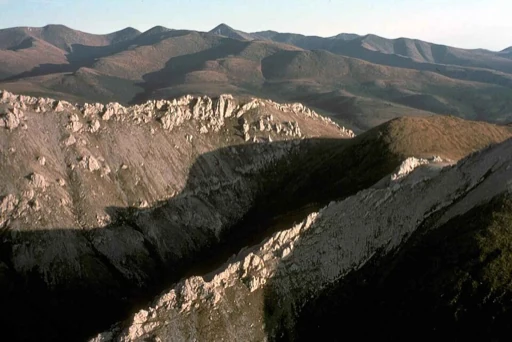
The comparison sliders show a visible increase in edge clarity and texture in all four examples. The broad subject remains recognizable: flowers remain a flower bed, the mountain ridge keeps its overall arrangement, the same cat remains central, and the rounded City Hall stays the focal building. These are useful observations about these four outputs only. They do not establish a success rate or a guaranteed result for another upload.
Changes to inspect
Generative enhancement redraws the image. In these examples, fine petals and foliage become more distinct, mountain ridges gain sharper texture, the cat's fur and eyes are rendered more clearly, and the building's windows and facade lines look crisper. Those details are plausible model output, not additional information verified against the original scene. A model can make an edge look confident while changing its exact shape.
Compare the full frame before zooming in. Check the horizon and ridge, the placement of individual flowers, the cat's whiskers and eye markings, the building's windows, nearby trees and any small people or objects. Also compare color and contrast. A more saturated or sharpened result may attract attention even when it has departed from the source. The correct choice depends on whether the image is for a casual preview or a use where every detail must remain faithful.
Dimensions and composition
The flower is a portrait image while the other three are landscape images. The generated results kept a similar overall orientation and framing in this batch, but the raw width and height varied by model response. The product normalizes only the longest edge and never stretches an image to a square. If a future result changes its aspect ratio, the tool should show the source and output side by side rather than hide the difference in an overlay.
Pixel dimensions describe the file grid, not the amount of verified photographic information. Scaling a generated result to 1,024 pixels does not create new camera samples. It produces a file that can be viewed or placed at a larger size while containing model-inferred detail. Do not interpret the 1K label as a guarantee of print quality or measured resolution recovery.
What this test cannot show
Each of the seven images was generated once. The initial four-image batch did not cover faces, scans or product imagery; the additional family portrait, bottle display and botanical scan are described below. These single examples do not validate identity, small lettering or factual accuracy. We did not test repeatability, motion blur, compression artifacts, night photos or transparent graphics, and did not run a blinded human preference study. Visual inspection of selected examples cannot establish general reliability.
The Commons previews were requested at a width of 960 pixels before downscaling. Their available source files are larger, so this set is not a comparison against the photographers' full-resolution originals. Because the model is stochastic and can change between requests, another generation may produce a different crop, texture, color or object detail. The original remains the authoritative source when fidelity matters.
When to use the result
For a casual preview, mood board or personal image where a generated interpretation is acceptable, compare the complete image and keep the version you prefer. For a product listing, label, artwork, architecture, identification, journalism, medical record, legal evidence or archive, use a better source file or a validated non-generative workflow instead. Check fine text and recognizable features against the source before using them as facts.
The selected image is previewed locally and sent to the processing service only after the user starts. Use only photos you are allowed to share with that provider. Keep the original separately, inspect the generated result, and download it only when its changes fit the intended use. The examples on the tool page link to the source pages and license information; the AI outputs are derivative demonstrations and do not replace those original records.
Common image-upscaling scenarios
Adobe and Topaz identify older photos, scans, cropped images and product imagery as common upscaling needs. We added a 1920 NARA family photo (512 × 412 input; raw output 2,794 × 2,252, displayed at 1,024 × 825), a CC0 bottle display (512 × 341; raw 1,534 × 1,025, displayed at 1,024 × 684), and an 1893 botanical plate scan (372 × 512; raw 1,069 × 1,471, displayed at 744 × 1,024). In these single runs, facial features, glass edges and reflections, and fine plate lettering can be reinterpreted. Verify identity, product appearance and text against the linked source before relying on them.
Source photos
- Flower · Waldemar Jan · CC0
- Mountain landscape · U.S. Fish and Wildlife Service · Public domain
- Cat · RobotBlanket · CC0
- London City Hall · Adrian Pingstone · Public domain
- Archive family portrait · photographer unknown; Franklin D. Roosevelt Library / NARA · Public domain
- Bottles and jars · CharMel Creations · CC0
- Scanned botanical plate · G.C. Dass / Chitra Slipi · Public domain


Open the AI image enhancer to compare a photo you are authorized to share.