Product test · Video eraser · FIELD GUIDE
Video subtitle, watermark and comment removal tested: eight occlusion cases
A fixed logo on a simple background is easier than text over a face or fabric. We publish all eight controlled results, including cases where the repair barely improved the picture.
Start with the result: the covered content sets the difficulty
“Remove subtitles” is not one difficulty. It can mean a fixed corner mark on a flat wall, a logo over a face, translucent text over fabric, scrolling comments, two-line subtitles or text over a changing scene. The outcome depends on whether clean background appears in other frames, how much of the picture is covered, how the overlay moves and whether the original texture remains after repair.
We compared ordinary Telea inpainting with the STTN configuration selected in the project at the time of testing. Results improved on flat backgrounds and sparse moving comments. For a difficult watermark covering a face, PSNR improved by only 0.87 dB and the repaired face was still visibly distorted. Translucent text over fabric improved by only 1.12 dB. These failure cases stay in the table; one attractive corner-logo result is not representative of every clip.
How the eight scenes were built
The controlled tests use the same public-domain DVIDS interview footage, cut to two seconds and normalized to 640 by 360 pixels at 24 fps, or 48 frames. Testers added synthetic corner logos, translucent text, captions and scrolling comments over clean frames. The original picture therefore provides an exact reference for the covered pixels. The repair model receives the covered frames and a mask, not the clean picture. Eight cases are variations on one source, not eight independently filmed clips or a sample of user uploads.
The primary metric is PSNR inside the synthetic covered region. Higher values mean pixels are closer to the known clean reference. Gain is the selected repair configuration minus the Telea baseline. Subtitle cases use STTN with glyph-tightened masks; other cases use STTN. PSNR measures pixel distance, not whether viewers find an image natural. The main table is scored before final video encoding; encoding effects are reported separately.
All eight controlled cases
| Synthetic case | Telea baseline PSNR | Selected configuration | Gain | Overlay mask recall |
|---|---|---|---|---|
| Fixed graphic logo · flat background | 33.87 dB | 41.94 dB | +8.08 dB | 100% |
| Fixed graphic logo · over a face | 11.98 dB | 12.85 dB | +0.87 dB | 100% |
| Translucent text watermark · flat background | 36.24 dB | 43.38 dB | +7.15 dB | 100% |
| Translucent text watermark · fabric texture | 15.52 dB | 16.64 dB | +1.12 dB | 100% |
| Scrolling comments · one simple line | 16.49 dB | 33.34 dB | +16.85 dB | 100% |
| Scrolling comments · two lines over a person | 17.44 dB | 28.15 dB | +10.71 dB | 99.92% |
| Burned-in subtitles · one simple line | 16.44 dB | 22.29 dB | +5.85 dB | 100% |
| Burned-in subtitles · difficult two-line case | 17.64 dB | 22.17 dB | +4.53 dB | 100% |
High PSNR means the covered pixels were closer to a clean reference in these synthetic examples. It does not guarantee a good-looking result. The face-logo case had 100% mask recall yet visibly damaged facial detail; detecting all overlay pixels is not the same as restoring them correctly. The comparison below uses public footage with a synthetic caption and an actual browser repair output.
The hard scrolling-comment case also had an optional refined-mask run: it scored 24.91 dB with 99.60% mask recall, compared with 28.15 dB and 99.92% for the default mask. That variant is useful for studying the trade-off between a tighter boundary and pixel similarity, but it is not substituted into the default eight-case table. Both figures remain measurements on one synthetic scene.
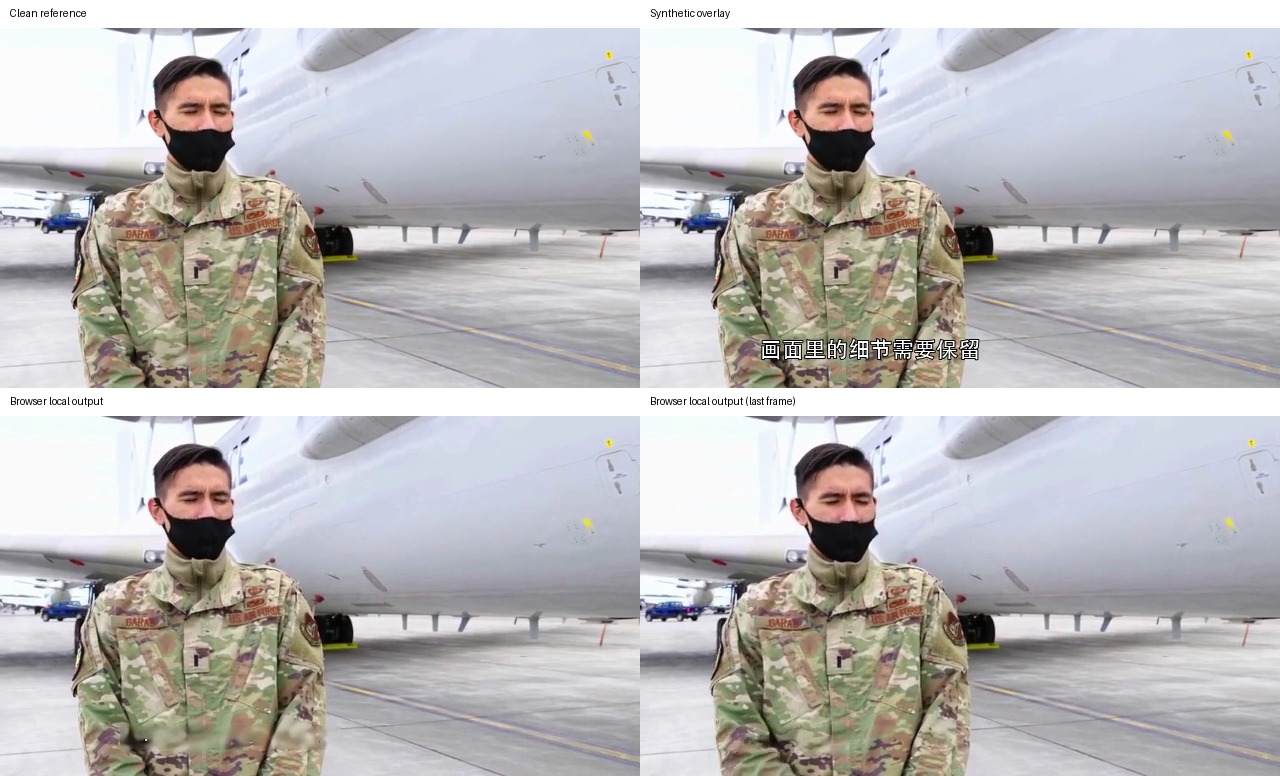
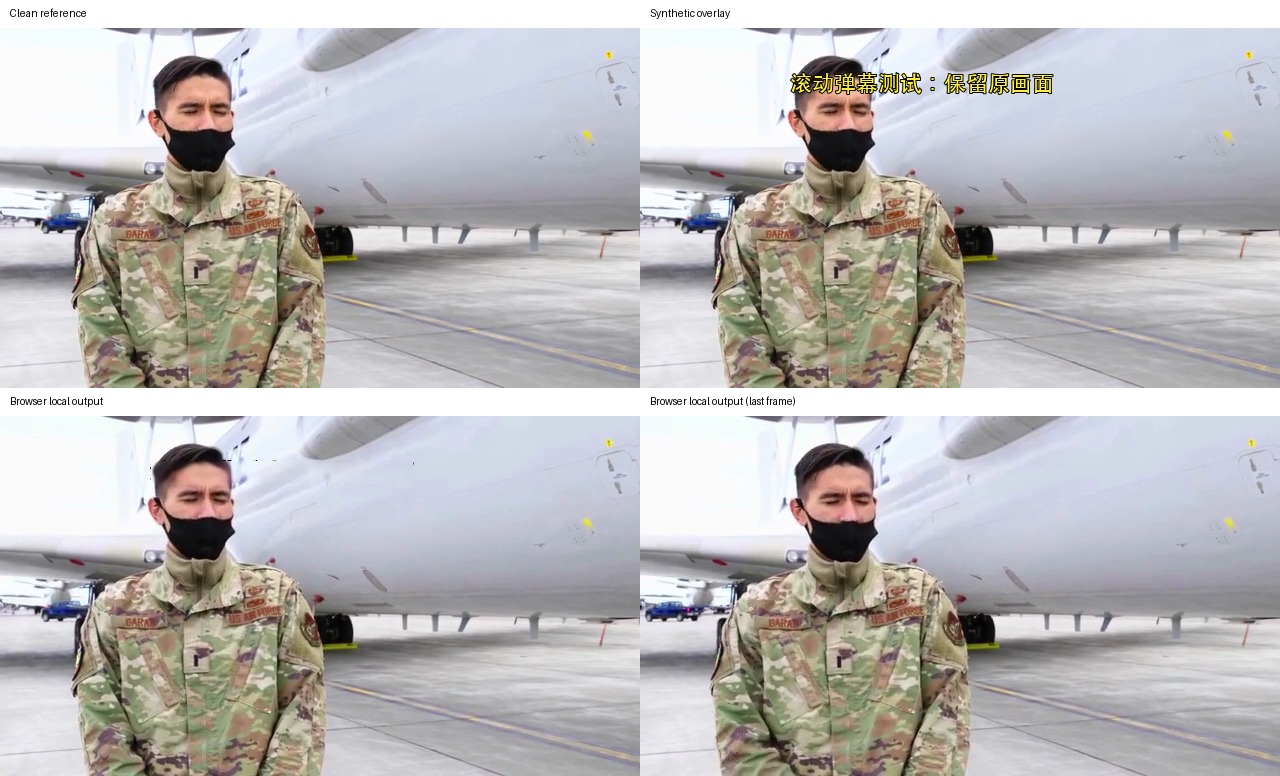
Rechecking compressed exports from the real browser workflow
The main benchmark measures model output before encoding. We also exported four test inputs as MP4s through QuietTake's local browser workflow and measured the decoded files, so the report does not rely only on internal model tensors. Each output is two seconds, 640 by 360 and 48 frames. Video and audio decoded successfully, and the export retained its audio track. This run used Chromium WebGPU on an Apple Silicon device with 16 GiB memory, with the model already in browser cache. The first-use model download, about 98.5 MB in this build, is not included in the timings.
| Type | Encoded covered-region PSNR | Covered-region MAE (0–255) | Outside-region MAE | Browser elapsed time |
|---|---|---|---|---|
| Graphic logo | 38.58 dB | 2.47 | 2.30 | 23.4 s |
| Translucent text watermark | 30.25 dB | 4.61 | 2.30 | 23.4 s |
| Two-line subtitles | 21.99 dB | 14.50 | 2.31 | 20.4 s |
| Scrolling comments | 24.16 dB | 5.57 | 2.30 | 23.0 s |
Outside-region MAE around 2.3 mostly reflects H.264 encoding differences. It does not mean the repair model regenerated the whole frame. Conversely, the algorithm table is measured before encoding on the same synthetic pixels. The two tables use different stages and should not be subtracted from each other. Browser timing is for this device, two-second samples and a warm model cache; it is not a real-time or universal speed promise.
Input/output samples and attribution are described in the experiment media record. The video above is a browser-produced MP4; the comparison images place repaired frames alongside clean references and synthetic overlays.
Why a good score can turn into a damaged picture
A fixed logo on a flat surface is easier because nearby pixels give the model plausible context. When a logo covers a face, hidden eyes, nose and skin detail may never appear in another frame; the model has to estimate them. A higher PSNR on this small sample does not restore real identity detail. For news, archives or evidence, do not present generated pixels as historical fact.
Translucent text over clothing is another difficult case. The mark mixes with fabric color, so removing it also changes the texture. Sparse moving comments may reveal background in other frames. If lines overlap, a person moves quickly or the background changes, the repair may leave fragments, trails or flicker. Subtitles over clothing, leaves or fine patterns are sensitive to mask width and glyph shape.
Mask recall has a narrow denominator: it measures how much of a known synthetic overlay was covered by the generated mask. The location and shape are controlled here. Real captions add outlines, shadows, compression noise and moving backgrounds. A recall of 99.6% does not mean “99.6% of user videos will be fixed.” It is pixel coverage in this experiment, not a product success rate.
How to review a clip of your own
Start with a copy and choose a representative interval, about two to five seconds, that contains the difficult overlay. Include movement, a subtitle change or a scene cut if that is where trouble occurs. A preview that shows only the first frame is not enough when the failure happens at the end. Confirm that the selected region does not also include faces, signs, ordinary scene text or important objects; a larger region asks the model to invent more pixels.
Watch once at normal speed, then inspect the repaired area. Pause to look at texture and text edges; play continuously to spot leftovers, ghosts, flicker or sudden shape changes. Check outside the mask for changes to faces, hands, clothing and background. Inspect the first and last frames, then seek to random positions instead of reviewing only the preview frame selected by the app.
Review audio as well. The controlled input contains a synthetic test tone, and browser exports retained a decodable audio track. That confirms the output pipeline in this run; it does not guarantee every browser or codec will preserve every soundtrack. Play the actual export, confirm duration and lip sync, and investigate an unexpected silent result instead of inferring audio behavior from a muted preview.
To reproduce the algorithm benchmark, run the project's eight-case script against the same inputs, clean references and scoring masks. Raw results and the browser-local output are stored separately. Report the model configuration, whether glyph tightening was used, resolution, frame rate, reference-frame strategy and encoding stage. Do not combine PSNR figures from different stages. H.264 changes decoded pixels, so post-encode MAE is not a substitute for the pre-encode model comparison.
The benchmark score is not a user success rate
Covered-region PSNR measures distance from known clean pixels. That works for synthetic tests with exact references. User videos rarely include an unobscured copy of every covered frame, so the same score cannot be calculated for ordinary uploads. A higher score means the pixels moved closer to the reference under this setup. It does not ensure natural-looking motion or recovery of the true hidden scene.
Mask recall has its own denominator too: the share of known overlay pixels included in a mask. Synthetic locations and shapes are controlled, while real subtitles include stroke, shadow and compression artifacts. Do not turn a 99.6% recall number into the claim that “99.6% of videos are successfully cleaned.” The practical questions are whether any text remains, whether normal objects were erased and whether the repair flickers during playback.
A two-second browser export time is not a real-time speed measure. The complete task may include video decoding, model download or cache reads, text detection, repair, audio encoding and output download. First-use downloads are separate. GPU, driver, browser, codec and available memory all influence speed and failures. Internal retesting should report both cold-cache and warm-cache runs and note precision fallbacks, missing frames or browser errors.
Practical guidance for creators
- Small fixed logo on a flat background: start with a short preview and inspect its edges against the picture.
- Burned-in captions or sparse comments: check line changes, subject movement and scene cuts throughout the interval.
- Marks over a face, fabric or an important object: check whether the underlying detail is distorted; retain the original when generated detail is unacceptable.
- A separate subtitle track or player comments: turn off or remove that layer first; rebuilding picture pixels is unnecessary and may reduce quality.
- Interviews, news and archives: keep the source, label the repaired copy as edited and do not present generated background as the original record.
In the video eraser, preview a short interval that includes the hardest part. Inspect edges, people, motion and the soundtrack before exporting. Strong results on simple fixed marks do not predict the difficult face and fabric cases in this test.
Method and limitations
The eight-case study uses Python and OpenCV for pixel scoring, plus actual local browser exports in Chromium. Metrics are calculated within synthetic mask regions against clean reference frames; MAE is mean absolute channel error. The repair set uses one base public-domain interview source with synthetic overlays. It does not cover all shots, fonts, resolutions, portrait video, HDR or dense full-screen scrolling comments.
The browser run used Chromium WebGPU on Apple Silicon with 16 GiB memory. Successful decoding proves the files are structurally readable, not that every frame looks flawless. Model files were already cached; first use requires a larger download. Different GPU, browser, driver and input codec can change speed or cause failure.
These tests are not a success-rate estimate for current arbitrary uploads and do not guarantee recovery of the real hidden picture. Dense overlays and human detail still need review. If generated scene detail would be more misleading than leaving a visible mark, keep the source or stop the repair.